Scienta Font: Adding Playful Warmth to Editorial Layouts
Last Tuesday, I found myself staring at a blank InDesign document for a new seasonal wellness guide. The content was solid—thoughtful essays on slow living, mindful recipes, and gentle movement routines—but the visual identity felt stuck. Every serif font I tried looked too academic, while the standard sans serifs felt cold and corporate. The project needed a typeface that could hold space without demanding attention, something that whispered "welcome" rather than shouting "look at me." That is when I decided to test Scienta.
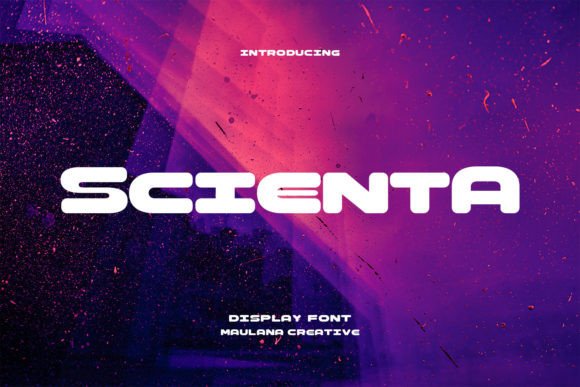
As an editorial designer who spends hours refining digital publications and printable guides, I have learned that typography is not just about legibility; it is about emotional resonance. Scienta is a bold display font with rounded edges that immediately softened the mood of my artboard. It possesses a unique duality: it is confident enough to serve as a primary headline but retains a playful, approachable character that invites the reader in. For creators building lifestyle brands, coaching workbooks, or digital magazines, finding this balance between authority and warmth is often the key to better audience engagement.
First Impressions on the Digital Canvas
When integrating a new creative font into a layout, I always start with the cover title. This is where Scienta truly shines. Its bold weight provides excellent contrast against negative space, making it ideal for ebook covers or newsletter headers. What struck me during this specific project was how the rounded terminals of the letterforms created a sense of safety. In the wellness niche, readers are often seeking comfort, and sharp, aggressive typography can subconsciously signal stress. Scienta’s geometry feels organic, almost like a handwritten note that has been refined for modern typography standards.
I used Scienta for the main title and chapter openers throughout the guide. Because it is a display typeface, it carries significant visual weight even at smaller sizes. This allowed me to maintain a clear visual hierarchy without cluttering the page. The font’s personality is distinct enough to establish brand identity instantly, yet it does not compete with photography or illustration. Instead, it frames the content, acting as a supportive container for the reader's experience.
Practical Applications Beyond the Cover
While Scienta is undeniably effective for titles, its utility extends further into editorial design when used intentionally. During my testing, I explored several applications where this premium font elevated the overall reading experience:
- Pull Quotes: Using Scienta for highlighted excerpts broke up long-form text and added rhythm to the page. The rounded shapes created a visual pause that encouraged readers to stop and reflect.
- Sidebar Headers: In recipe sections, using Scienta for labels like "Prep Time" or "Chef’s Tip" made functional information feel like part of the narrative rather than metadata.
- Social Media Graphics: The bold strokes remain crisp when scaled down for Instagram carousels or Pinterest pins, ensuring readability on mobile screens.
- Printable Worksheets: For interactive elements like journaling prompts or checklists, the font’s friendly aesthetic reduced the intimidation factor often associated with structured tasks.
It is important to note where Scienta fits best. As a display font, it is optimized for short bursts of text. I would not recommend setting body copy in this typeface, as the bold weight and stylized forms can reduce readability over long paragraphs. Instead, treat it as an accent instrument in your typographic orchestra, reserved for moments where you need to set the tone or guide the eye.
Building Harmony Through Font Pairing
A typeface never exists in isolation. The success of Scienta in my wellness guide depended heavily on what I paired it with. Because Scienta has such a strong, rounded personality, it requires a partner that offers stability and neutrality. For the body text, I chose a clean, humanist sans serif font with open counters and generous x-heights. This combination created a beautiful tension: the headlines felt warm and expressive, while the body copy remained grounded and highly legible.
If you are designing a wedding guide or a more traditional editorial piece, Scienta also pairs surprisingly well with high-contrast serif fonts. The softness of Scienta offsets the formality of a classic serif, resulting in a modern, sophisticated look that avoids feeling stuffy. When experimenting with font pairing, always check the optical alignment. You may need to adjust tracking or leading slightly to ensure the transition between the display header and the body text feels seamless. The goal is to create a cohesive visual language where every element supports the story you are telling.
Readability Across Formats and Devices
In today’s multi-format publishing landscape, a font must perform across print PDFs, e-readers, and responsive web layouts. I tested Scienta in all three environments. On screen, the bold weight holds up well against backlit displays, though I recommend increasing line height slightly for digital headers to prevent the letters from feeling cramped. For print materials, the ink traps and rounded corners render beautifully, adding a tactile quality to physical pages.
For creators selling digital downloads or templates, consistency is vital. Readers should recognize your content whether they are viewing it on a phone or holding a printed workbook. Scienta’s robust construction ensures that the brand identity remains intact regardless of the medium. However, always preview your layouts at actual size before finalizing. What looks balanced on a 27-inch monitor might need adjustment when viewed on a mobile device or printed on A4 paper.
Licensing and Technical Considerations
Before committing to any commercial font for client work or products intended for sale, due diligence is essential. When downloading Scienta, review the licensing terms carefully. Ensure the license covers your specific use case, whether that is embedding in an EPUB, using in a paid newsletter, or including in a template for resale. Many independent type designers offer tiered licensing, so selecting the right package protects both you and the creator.
Additionally, explore the full character set. High-quality display fonts often include alternate characters, ligatures, and multilingual support that can add unique flair to your designs. I discovered that utilizing specific alternates in Scienta allowed me to customize the logotype for the guide, giving it a bespoke feel without hiring a custom lettering artist. Checking file formats is equally important; having access to OTF, TTF, and WOFF2 files ensures you can use the font across desktop software, web platforms, and mobile design apps without compatibility issues.
Typography is ultimately an act of hospitality. When we choose a typeface like Scienta, we are making a decision about how we want our readers to feel before they even read a single word. It is a choice that prioritizes connection over convention, warmth over rigidity. Whether you are redesigning a lifestyle blog, crafting a course PDF, or laying out a digital magazine, remember that the right font does more than display text—it sets the stage for a meaningful reading experience. By approaching type selection with intention and care, we build better, more enjoyable spaces for our audiences to inhabit.