Enyak Font Review: Playful Display Type for Web Design
I was recently redesigning a landing page for a creative coaching client who wanted her site to feel less corporate and more authentically human. We had cycled through several modern sans serif options that felt too sterile and a few script fonts that felt dated. Then I tested Enyak in the hero section. The difference was immediate. This quirky and playful display font brought a warmth to the digital layout that standard web-safe typography simply could not achieve. As a web designer, I am often cautious about using highly stylized typefaces in responsive environments, but testing Enyak across desktop and mobile viewports revealed it to be a surprisingly versatile asset for brands prioritizing personality over rigid structure.
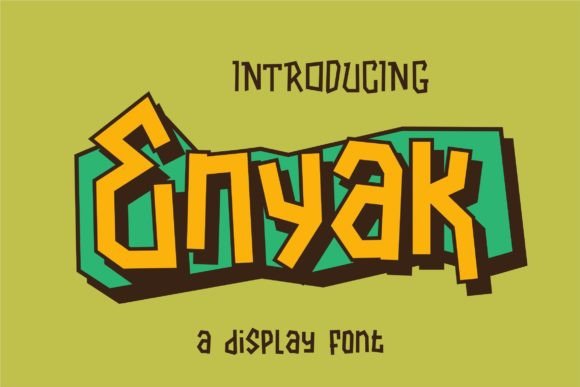
Enyak is defined by its irregular letter shapes and hand-drawn aesthetic. Unlike geometric display fonts that rely on mathematical precision, Enyak embraces imperfection. The curves are organic, and the strokes have a varied weight that mimics natural handwriting without sacrificing legibility at larger sizes. In a digital context, this creates a visual texture that breaks up the monotony of grid-based layouts. When placed against a solid color background or overlaid on a lifestyle photograph, the font acts as a graphical element as much as a textual one, drawing the user’s eye and establishing an approachable brand tone within seconds of the page loading.
Performance in Hero Sections and Digital Headers
The primary strength of Enyak lies in its ability to anchor a hero section. During my testing on a boutique e-commerce homepage, I used Enyak for the main value proposition headline. The irregularity of the characters created a dynamic rhythm that guided the eye across the screen. Because the font has such distinct character, it allowed us to reduce the word count significantly. Instead of a long, explanatory subhead, the typeface itself communicated the brand's playful and artisanal identity. This is crucial for modern web design where attention spans are short and visual hierarchy dictates user flow.
However, utilizing a decorative font like Enyak in headers requires careful attention to responsive scaling. On a 27-inch monitor, the intricate details of the hand-drawn strokes are crisp and engaging. On a mobile device, those same details can risk becoming muddy if the font size is scaled down too aggressively. I found that Enyak performs best when given ample breathing room. Tight tracking or compressed line heights tend to negate the open, friendly nature of the design. For mobile breakpoints, I recommend increasing the line height slightly and ensuring the font size remains large enough to preserve the integrity of the irregular shapes. It works beautifully for H1 and H2 tags but should generally be avoided for H3s or smaller subheaders where clarity takes precedence over style.
Strategic Font Pairing for UI Clarity
A common pitfall when working with expressive display fonts is pairing them with equally loud companions. Enyak demands a supportive, quiet partner. In my recent project, I paired it with a clean, neutral sans serif font for all body copy, navigation menus, and button text. This contrast is essential for usability. The playfulness of Enyak provides the emotional hook, while the structured sans serif ensures that product descriptions, pricing, and logistical information remain instantly scannable.
For brands seeking a more editorial or sophisticated digital identity, Enyak also pairs unexpectedly well with a simple serif font. The combination of the organic, hand-drawn display face with a traditional serif body creates a tension that feels both contemporary and timeless. This pairing worked particularly well for a digital magazine layout I prototyped, where Enyak was used for pull quotes and article titles while the serif handled the long-form reading. Avoid pairing Enyak with other handwritten or script fonts; the competing irregularities create visual noise that degrades the user experience and makes the interface feel cluttered rather than curated.
Readability and Accessibility Considerations
While Enyak excels at setting a mood, it is vital to recognize its limitations regarding accessibility and functional UI elements. This is not a typeface for dense paragraphs, form labels, or navigation links. The irregular baseline and varying x-heights, which give it charm in headlines, make it difficult to read at small sizes or in long blocks of text. During accessibility testing, I confirmed that Enyak should be reserved strictly for decorative purposes and short phrases. Always ensure that any critical information presented in Enyak is also available in a more legible format or supported by proper semantic HTML structure so screen readers can interpret the content correctly regardless of the visual styling.
Contrast ratios also require special attention with this typeface. Because the strokes vary in thickness, thin sections of the letters can disappear against busy backgrounds or low-contrast color combinations. When using Enyak over images, I strongly recommend applying a subtle overlay or gradient to ensure the text maintains WCAG compliance. On dark mode interfaces, the hand-drawn edges can sometimes appear to vibrate or blur due to pixel rendering. Testing on multiple devices is necessary to ensure the font renders cleanly across different operating systems and browsers. If your site relies heavily on dark mode, consider having an alternative, simpler display font ready as a fallback for specific high-contrast scenarios.
Best Use Cases for Online Brand Experiences
Based on real-world layout testing, Enyak is most effective for specific types of digital projects where personality is a key conversion driver. It shines in environments that benefit from a human touch:
- Creative Portfolios: Perfect for artist names, project titles, and introductory statements that need to convey individual style.
- Boutique E-Commerce: Ideal for category banners, seasonal sale announcements, and packaging preview graphics on product pages.
- Coaching and Wellness Sites: Helps soften the clinical feel of service descriptions and creates a welcoming atmosphere for potential clients.
- Course Landing Pages: Excellent for module titles and testimonial highlights to break up sales copy and maintain engagement.
- Digital Product Previews: Adds authenticity to mockups of planners, journals, and printable wall art sold online.
Conversely, I would advise against using Enyak for SaaS dashboards, financial services, legal websites, or any interface where data density and rapid scanning are paramount. In these contexts, the quirkiness can be misread as unprofessional or distracting. The font is a tool for connection, not utility. Understanding this distinction is key to leveraging it effectively in your web design toolkit.
Licensing and Technical Implementation
Before integrating Enyak into a live web project, always verify the specific licensing terms included with your purchase. Webfont licenses often differ from desktop licenses, and using a font file intended for print design in a CSS @font-face declaration can lead to legal issues. Check whether the license covers the number of monthly page views your site receives and whether it permits use in digital templates or client work. Additionally, review the included file formats; WOFF2 is currently the industry standard for web performance, offering superior compression compared to older TTF or OTF files.
Finally, explore the full character set before committing to a layout. Many premium display fonts include alternates, ligatures, and swashes that can enhance the custom feel of a website. Using OpenType features in CSS allows you to access these variations without needing to create static images, keeping your site fast and SEO-friendly. Multilingual support is another critical factor if you are designing for a global audience; ensure the font includes the necessary glyphs for your target languages to avoid awkward fallback substitutions that break the visual harmony. By treating Enyak as a strategic design asset rather than just a decorative afterthought, you can create digital experiences that feel genuinely crafted and memorable.