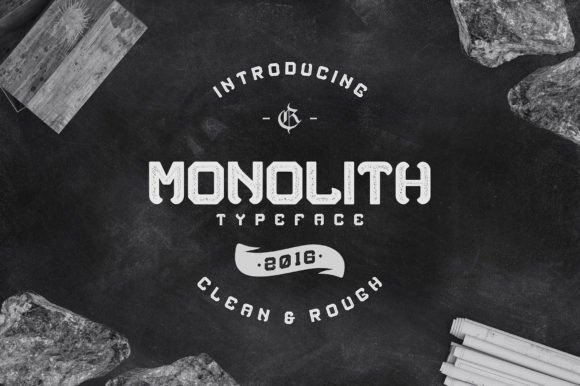
Monolith Font: Soft Grunge for Editorial Design
There is a specific moment in every editorial layout project where the mood board feels perfect, but the typography falls flat. I experienced this exact friction last month while redesigning a seasonal wellness guide. The content was grounded and earthy, focusing on slow living and intentional habits, yet every display font I tested felt either too polished or too chaotic. Clean sans serifs lacked soul, while traditional grunge typefaces felt too aggressive for a publication meant to soothe the reader. That was when I decided to test Monolith, a unique rounded grunge display font that promised to bridge the gap between raw texture and gentle approachability.
Using Monolith for the guide’s cover title and chapter openers transformed the entire reading experience. It wasn't just about aesthetics; it was about finding a typeface that respected the reader's emotional state. In modern typography, we often have to choose between impact and comfort. Monolith suggests we don't have to compromise. Its rounded edges soften the inherent roughness of the grunge texture, creating a balanced boldness that feels established yet kind. For creators building lifestyle brands, coaching workbooks, or digital magazines, this distinction matters immensely.
Finding Warmth in Raw Textures
When designing for wellness, hospitality, or creative education, the visual language must signal safety before the audience reads a single word. Standard distressed fonts can sometimes read as damaged or messy, which creates subconscious cognitive load. During my layout process, I noticed that Monolith retains the organic imperfections of hand-printed lettering without sacrificing legibility. The uppercase letters pack a punch, anchoring the page with confidence, but the softened terminals prevent the eye from catching on harsh jagged edges.
This balance makes it an exceptional choice for blog headers and newsletter graphics where you need to stop the scroll without shouting. In my wellness guide, I used it for the main title and section dividers. The result was a cover that looked artisanal and premium rather than DIY. It communicated that the content inside was curated and thoughtful. For editorial designers, this means the font does the heavy lifting of establishing brand identity before the reader engages with the body copy.
Practical Applications Across Formats
Versatility is the hallmark of a truly useful display font. While testing Monolith across different deliverables, I found it performed consistently well in both digital and print environments. Here is how it translated across various editorial needs:
- Ebook Covers and Titles: The weight of the font holds up beautifully against textured backgrounds or photography. It provides necessary contrast without needing excessive drop shadows or outlines.
- Pull Quotes and Sidebars: In long-form articles, Monolith works wonderfully for highlighting key takeaways. The grunge texture adds visual interest to break up dense text blocks, keeping the reader engaged through the middle of the piece.
- Printable Planners and Worksheets: For digital products intended for home printing, ink spread can be a concern. Because Monolith’s distress is integrated into the vector shapes rather than applied as a raster overlay, it prints cleanly at various sizes without looking muddy.
- Social Media Templates: The bold uppercase forms are readable even on small mobile screens, making it ideal for Instagram carousels or Pinterest pins promoting blog content.
It is worth noting where this typeface shines brightest. Monolith is strictly a display font. It is designed for headlines, logos, packaging design, and short decorative accents. Attempting to use it for paragraphs or extended reading will fatigue the reader and diminish the special character of the letterforms. Reserve it for moments where you need to make a statement, and let other typefaces handle the narrative flow.
Curating Visual Hierarchy and Pairings
A premium font never exists in isolation. The success of Monolith in my project relied heavily on thoughtful font pairing. Because the typeface has so much personality and texture, it demands a supportive partner that offers stability and high readability. When building your editorial system, consider these pairing strategies to maintain professional polish:
- The Classic Serif Body: Pairing Monolith with a refined serif font for body copy creates a sophisticated "magazine" aesthetic. The contrast between the rough display header and the smooth, structured body text guides the reader’s eye naturally down the page. This combination works exceptionally well for wedding guides, literary journals, and heritage brands.
- The Clean Sans Serif Support: For a more contemporary or tech-adjacent feel, match Monolith with a geometric or humanist sans serif. Use the sans serif for captions, navigation, metadata, and subheads. This allows Monolith to serve as the artistic focal point while the sans serif handles functional communication. This is my preferred method for coaching workbooks and course PDFs.
- Script Accents: If your brand leans feminine or romantic, a delicate handwritten script can complement Monolith’s boldness. Use the script for secondary words in a title stack (like "the," "and," or "of") to create dynamic rhythm. Just ensure the script doesn't compete for attention; it should whisper while Monolith speaks.
Visual hierarchy is ultimately about managing attention. By using Monolith exclusively for primary touchpoints, you train your audience to recognize it as a signal of importance. Consistency in this application builds trust and reinforces your publication’s identity over time.
Technical Considerations for Publishers
Before integrating any creative font into a commercial workflow, due diligence is essential. As publishers and product creators, we must ensure our design assets are legally and technically sound. When evaluating Monolith for your next project, verify the licensing terms specifically for your use case. A personal license might cover a hobby blog, but selling an ebook, offering a paid newsletter, or creating client work typically requires a commercial font license. Always check the foundry’s documentation regarding webfont usage, embedding in PDFs, and template redistribution.
Additionally, explore the included OpenType features. Many premium display fonts include alternates, ligatures, and multilingual support that can elevate a standard layout into something bespoke. Swapping a standard character for a stylistic alternate in a logo or header can customize the typeface to better fit your specific brand voice. Finally, test the font across devices. What looks perfectly distressed on a 27-inch retina monitor might appear too faint on a low-resolution e-reader or too heavy on a cheap office printer. Real-world testing ensures your beautiful typography remains accessible and effective for every member of your audience.
Choosing the right typeface is an act of empathy toward your reader. It sets the stage for the story you are about to tell. Monolith offers a rare combination of strength and softness that resonates deeply in today’s editorial landscape. Whether you are crafting a recipe ebook, refreshing a lifestyle blog, or designing a transformative coaching workbook, this rounded grunge display font provides the texture needed to make your content feel tangible, human, and intentionally designed. It reminds us that even in digital spaces, there is room for the imperfect, the tactile, and the beautifully bold.