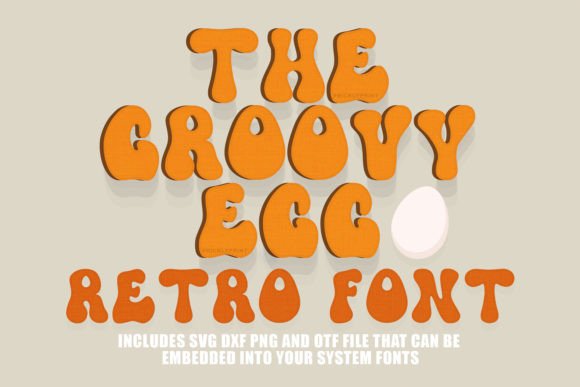
Groovy Egg Font: A Retro Display Typeface Review
Last Tuesday, while finalizing the spring issue of our digital lifestyle publication, I found myself staring at a blank cover layout. The photography was soft and nostalgic, featuring pastel ceramics and wildflowers, but the headline felt disconnected. We needed a typeface that could bridge the gap between modern editorial clarity and the warm, tactile feeling of 1970s craft culture. This is often the moment where standard sans serifs feel too sterile and traditional scripts feel too formal. After testing several options, I settled on the Groovy Egg font for the main title treatment, and it immediately resolved the visual tension on the page.
As an editorial designer who frequently balances aesthetic trends with functional readability, I approach display fonts with a healthy dose of skepticism. However, Groovy Egg stands out as a thoughtful addition to the creative font landscape. It is not merely a novelty asset; it is a hand-drawn typeface with enough structural integrity to serve as a reliable anchor in content layouts. For publishers, bloggers, and digital product creators looking to inject personality without sacrificing professional polish, this retro-style font offers a distinct solution for establishing publication identity.
Visual Character and Editorial Mood
The defining characteristic of Groovy Egg is its organic rhythm. Unlike digitally generated retro revivals that can sometimes feel rigid or mathematically perfect, this font retains the subtle imperfections of hand lettering. The curves are playful yet controlled, creating a sense of movement that guides the eye across the page rather than arresting it. In our cover test, the letterforms interacted beautifully with negative space, allowing the headline to breathe alongside the imagery.
This visual warmth translates directly to editorial mood. When designing for niches like wellness, cooking, parenting, or creative arts, the typography must signal safety and approachability before the reader processes a single word of copy. Groovy Egg achieves this through its rounded terminals and generous x-height. It evokes a sense of handmade authenticity that aligns perfectly with current design trends favoring human-centric branding over corporate minimalism. For a recipe ebook or a coaching workbook, this typeface suggests that the content within is personal, tested, and created with care.
Practical Applications in Content Layouts
In my recent project redesigning a holistic wellness newsletter, I utilized Groovy Egg specifically for section headers and pull quotes. The results highlighted where this display font truly excels in a publishing workflow:
- Cake Toppers and Physical Products: While primarily reviewed here for digital editorial use, the font’s thick strokes and connected flow make it exceptionally legible when cut from vinyl or cardstock. The weight holds up well in physical manufacturing, avoiding the fragile thin lines that often plague delicate script fonts.
- Digital Magazine Covers: Used at large sizes (72pt and above), the personality of the letterforms becomes fully apparent. It works best as a primary focal point rather than a supporting element.
- Social Media Graphics: For Instagram carousels or Pinterest pins promoting blog posts, Groovy Egg provides instant recognition. The retro aesthetic performs well in feeds saturated with clean sans serifs, helping content stop the scroll.
- Worksheet and Planner Titles: In printable PDFs, the font adds a decorative touch that makes educational or organizational materials feel less clinical and more inviting to engage with.
However, it is equally important to recognize where this typeface should be applied with restraint. During the layout process, I tested Groovy Egg for subheads and introductory paragraphs. At smaller sizes, the intricate curves began to lose definition, and the playful tone undermined the seriousness of the informational content. This reinforced a crucial editorial principle: Groovy Egg is a specialist, not a generalist. It belongs in titles, accents, and short-form highlights, never in body copy or dense text blocks.
Readability and Hierarchy Considerations
Readability in display typography is different from body text readability. We are not optimizing for sustained reading speed; we are optimizing for immediate comprehension and emotional resonance. Groovy Egg succeeds because its retro style does not compromise legibility. The characters are distinct from one another, avoiding the confusing similarities between 'a' and 'o' or 'r' and 'n' that often plague handwritten fonts.
For mobile layouts, this distinction is vital. On smaller screens, display fonts can easily become muddy. I found that Groovy Egg maintains its integrity even when scaled down for mobile article headers, provided there is adequate line spacing. Because the font has significant vertical presence due to its ascenders and descenders, increasing leading (line height) by 10-20% prevents the letters from feeling cramped. This small adjustment ensures the retro vibe remains relaxed rather than cluttered.
When building visual hierarchy, treat Groovy Egg as the loudest voice in the room. If your H1 uses this font, your H2s and H3s should likely step back into a quieter, simpler typeface. This contrast is what creates a sophisticated editorial structure. Using multiple expressive fonts simultaneously competes for attention and exhausts the reader. Let Groovy Egg do the heavy lifting for brand personality, and allow other elements to handle navigation and information delivery.
Font Pairing Strategies for Publishers
A premium font lives or dies by its partners. To integrate Groovy Egg into a cohesive publication identity, pairing is essential. Based on my layout testing, here are three reliable combinations for different editorial contexts:
- The Modern Heritage Look: Pair Groovy Egg with a high-contrast serif font like Playfair Display or Merriweather for body copy. The sharpness of the serif grounds the fluidity of the display font, creating a balance between nostalgia and contemporary authority. This is ideal for food blogs and cultural magazines.
- The Clean Utility Approach: Combine it with a geometric sans serif like Montserrat or Lato. The neutrality of the sans serif allows Groovy Egg to shine as a pure accent without visual competition. This works exceptionally well for course PDFs, worksheets, and instructional content where clarity is paramount.
- The Soft Minimalist Vibe: Use a light-weight monoline sans serif for captions and metadata. The uniform stroke width of the companion font echoes the hand-drawn nature of Groovy Egg without mimicking it, resulting in a harmonious, gentle aesthetic suitable for wedding guides or wellness newsletters.
Licensing and Technical Specifications
Before integrating any new typeface into commercial projects, verifying technical details is non-negotiable. Groovy Egg includes the OTF (OpenType) file format, which is the industry standard for professional publishing. OTF files generally offer better cross-platform compatibility and support for advanced typographic features compared to older TTF formats. When installing, check the glyph panel for alternates or ligatures that may enhance specific letter combinations in your headlines.
Equally important is understanding the licensing terms for your specific use case. If you are creating client work, selling templates, or publishing paid digital downloads, ensure your license covers commercial distribution. Many independent font creators offer tiered licensing, so taking a moment to review these terms protects both your business and the type designer. Additionally, if you plan to embed the font in an ebook or use it via webfont technology, verify that the license explicitly permits embedding, as desktop licenses do not always cover these digital applications.
Ultimately, Groovy Egg serves as a reminder that editorial design is about feeling as much as function. In a digital landscape that often prioritizes efficiency over expression, having a tool that brings genuine warmth to a layout is valuable. Whether you are refreshing a blog header, designing a printable planner, or setting the tone for a new magazine issue, this typeface offers a confident, readable, and distinctly human touch that resonates with today’s audiences.